
Complete these steps before your intake appointment. Please reach out to us at workforce-ed@bellevuecollege.edu or 425-564-4054 if you need help with any of them.
Apply for Admission
If you haven’t applied for admission to Bellevue College yet, please do so before your intake appointment.
New to Bellevue College?
Once your application is processed (typically takes 2-3 business days):
Returning student?
You may need to reapply to the college if it’s been more than two years since you last attended.
Tips for the admissions application:
- You will be asked to select a program:
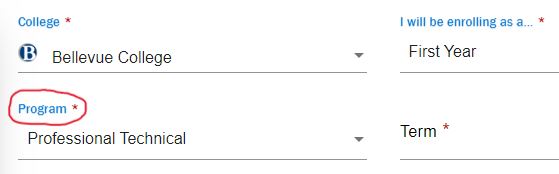
- Most Workforce Education students will find their degree or certificate under “Professional Technical.” However, BFET students pursuing career-specific transfer degrees will find them under “Academic,” and students pursuing BAS programs will find them under “Baccalaureate.”
- Note that “Transitional Studies” does not refer to transfer degrees; it refers to pre-college programs such as English Language Acquisition (ELA), Adult Basic Education (ABE), and High School Completion (HSC). Workforce Education students who will take pre-college classes may still select “Professional Technical,” then their intended degree or certificate. Selecting “Professional Technical” allows you to answer helpful questions about your residency status, and you may still enroll in pre-college classes.
- In the “Personal Information” section, enter your Social Security Number (if you have one). Workforce Education uses your SSN to verify eligibility and whether you receive certain benefits such as food assistance or cash assistance. The admissions application is a secure way to provide SSN information to the college.
Gain Enrollment Access
If you’re new to BC, you will have a couple holds on your account that prevent enrollment in classes until you:
- Complete New Student Orientation (NSO) and attend a New Student Enrollment (NSE) session
- Complete the Student Financial Responsibility Agreement
Prepare Supporting Documents
You may submit requested documents directly to your advisor, either by email or when you meet with them. Documents can also be emailed to workforce-ed@bellevuecollege.edu or submitted via our Upload Documents page.
All WE applicants:
- Unofficial transcript (if available) for any non-BC classes you’ve taken
BFET applicants:
- No supporting documents needed. Your advisor will let you know if anything additional is required to verify you receive federal food benefits.
Opportunity Grant (OG) applicants:
- Your most recent tax return (or your parents’ most recent tax return if you are under age 24), and
- 2 months’ verification of household income (checks stubs or other documentation) from all sources
WorkFirst applicants:
- All documents emailed to you by the WorkFirst advisor – read, completed, and signed
- A referral from your DSHS case manager. (They will send this to the college using a shared online system.)
Worker Retraining applicants:
Supporting documentation will vary based on how you qualify for the program.
- Receiving or exhausted UI benefits:
- Log in to Employment Security eServices
- Go to “Manage my (Active) claim”
- Go to “Weekly Summary”
- Take a screenshot that includes your name and most recent payment information, or final payment if exhausted
- Applying for UI benefits but don’t have an active claim: submit Layoff Notice
- Veteran: submit DD214
- Formerly self-employed:
- Self-attestation of eligibility. Please note that your business must be shut down to qualify under this category. You will not qualify if your business is open but declining or operating part-time.
- Most recent tax document indicating self-employment with wages earned
- Prior tax documents showing wages were higher in previous years
- Credible info about economic conditions that led to unemployment, e.g. news article from reputable publication, data from L&I, published studies. Chat GPT screenshots are not allowed.
- Displaced Homemakers: submit Divorce Decree, Death Certificate, etc.
Last Updated September 8, 2026